
 book a call with us
Building in Web3 still feels heavier than it should. Developers spend more time fixing infra, writing listeners, and stitching chains together than actually shipping features. A Web3 backend platform for developers is no longer a nice-to-have. It’s essential. Kwala steps in as a developer backend platform that Web3 teams can trust. It provides multi-chain workflow automation for developers, a serverless blockchain infrastructure for developers, and a no-DevOps […]
Read MoreWeb3 alerts automation refers to systems that monitor blockchain events — token transfers, price movements, wallet balance changes, and smart contract state updates — and trigger real-time Web3 notifications or automated actions in response. Most tools in this category stop at the notification step. The platforms that close the loop, like Kwala, connect on-chain events to multi-step workflows that execute the next action automatically — portfolio rebalancing, contract pausing, payment routing, or anything else the situation calls for.
That distinction matters more than it sounds. The cost of running a Web3 application that only notifies you is that someone — usually an engineer on call — must be the loop. This guide is about removing that.
Key Takeaways
- Web3 alerts are necessary but not sufficient. Crypto markets run 24/7; manual monitoring stopped scaling years ago. But notification-only tools push the response burden back onto your engineering team.
- Most alert tools stop at “something happened.” Alchemy Webhooks, QuickNode QuickAlerts, Notifi, Tatum Notifications, and Push Protocol are all primarily notification systems. Acting on the alert is your problem.
- Workflow-based alerts close the loop. When an alert fires, the system can also evaluate conditions, call contracts, and execute follow-up actions automatically — without a backend service in the middle.
- The four canonical alert types are token price, wallet balance, smart contract events, and large transactions. Each maps to a different operational problem and a different action chain.
- The right question isn’t “which tool sends the best alerts?” — it’s “what should happen when the alert fires?” That’s the question this guide is built around.
What Are Web3 Alerts and Why Do They Matter?
A Web3 alert is a signal generated when a defined on-chain condition is met. The condition could be a token price crossing a threshold, a wallet balance dropping below a floor, a smart contract emitting a specific event, a large transaction landing in a tracked address, or a governance proposal reaching a quorum. The alert itself is the moment the system says “this thing you cared about just happened.
Five categories cover most production use cases.
Price alerts.
A token’s price crosses a threshold — for liquidation triggers, treasury rebalancing, arbitrage execution, or simply user-facing notifications.
Wallet balance alerts.
A wallet’s balance falls below a configured floor — common for relayer accounts, treasury wallets, gas-sponsorship accounts, and operational addresses that need to stay funded.
Smart contract event alerts.
A contract emits a specific event — a mint, a transfer, a vote, a state change. Most application-level automation lives here.
Large transaction alerts.
A transaction above a threshold lands in a tracked address — for whale-watching, MEV detection, or compliance monitoring.
Governance alerts.
A proposal reaches a quorum, a vote is cast, a timelock expires. Operationally critical for DAOs and treasury teams.
The reason this category exists at all is that crypto markets don’t sleep. A 24/7 market with no opening or closing bell can’t be monitored manually past the first few weeks. Either you build a system that watches the chain for you, or you accept that things will go wrong while you’re not looking. Web3 alerts are the minimum viable form of that system — they tell you what happened, when, and where.
For more on how event listeners work in practice, see the Kwala event listener docs.
How to Set Up Token Price Alerts with Kwala
Token price alerts are the most common alert type and the easiest to get wrong. The naive implementation polls a price feed every minute and fires a webhook when the price crosses a threshold. The production implementation handles oracle latency, threshold debouncing (so a price oscillating around the threshold doesn’t fire fifty times), finality, and downstream action retries.
Kwala handles those mechanics natively. A price alert in Kwala is a workflow with three components: a trigger that watches a configured oracle or price feed, a condition that defines the threshold, and one or more actions that execute when the condition is met.
The trigger can pull from on-chain price oracles (Chainlink, Pyth, RedStone) or from off-chain price APIs through Kwala’s Web2 integration. The condition supports both absolute thresholds (“ETH crosses $4,000”) and relative ones (“ETH drops 5% within 1 hour”). The action can be a notification — Discord, Slack, email — or it can be an on-chain transaction, a Web2 API call, or a chain of multiple steps.
The structural difference between Kwala and a webhook-only tool shows up in the action layer. With Alchemy Webhooks or QuickNode QuickAlerts, your action is “receive the webhook in your backend and figure out what to do next.” With Kwala, the action is part of the workflow definition itself — no backend in the middle, no webhook handler to maintain, no retry logic to write.
For the full step-by-step build, including configuration examples and oracle selection guidance, see the dedicated tutorial on token-based price notifications. The deeper documentation on price triggers covers the full configuration surface.
Real-Time Wallet Balance Monitoring: Low Balance & USDC Alerts
Wallet balance alerts solve a specific operational problem: keeping critical accounts funded. They show up in a few canonical patterns.
Low balance thresholds for operational wallets
Relayer accounts, gas-sponsorship wallets, treasury operational addresses — any wallet that must stay funded to keep a system running. The cost of one of these wallets running dry isn’t dramatic; transactions just start failing silently. A low-balance alert catches the problem before users notice.
The standard pattern: define a floor (gas amount, USD value, or token count), monitor the wallet at a configurable interval, and fire an alert when the balance crosses below the floor. With Kwala, the alert can also trigger an automated top-up — pull from a treasury wallet, swap to the right asset, send the transaction, and verify the balance recovered. Without that final step, someone still must wake up and refund the wallet manually.
A minimal Kwala workflow for this pattern looks roughly like:
trigger:
type: wallet_balance
network: base
address: “0xRelayerWallet…”
asset: native
threshold:
operator: less_than
value: 0.1 # ETH equivalent
action:
type: contract_call
network: base
contract: “0xTreasuryRouter…”
function: refundRelayer
params:
target: “0xRelayerWallet…”
amount: 1.0
That’s the entire backend for a self-healing relayer wallet. No server, no cron job, no on-call engineer.
Stablecoin-specific alerts (USDC, USDT, DAI)
Stablecoin balance alerts are operationally distinct from native-token alerts because the asset is on a contract, not at the protocol level. Tracking a USDC balance means watching ERC-20 transfer events for a specific address — a slightly different code path than watching native ETH or MATIC.
Most teams that need this pattern are either running stablecoin-denominated payment systems, treasury operations holding stablecoin reserves, or DeFi protocols with stablecoin-collateralized positions. The action chain typically involves rebalancing, collateral management, or replenishment.
For the implementation details on USDC-specific alerts and how to extend the pattern to other ERC-20s, see the dedicated guide on real-time USDC alerts. For low-balance alerts specifically, the deeper guide on instant alerts for low wallet balance covers the configuration nuances.
Blockchain Activity Alerts: Monitoring Transactions, Events, and Fraud
The broadest category — alerts triggered by general on-chain activity. Three patterns cover most of the production use cases.
Whale watching.
Tracking large transactions in or out of specific addresses — exchange wallets, DAO treasuries, suspected MEV bots, known whales. The alert is informational; the action is usually downstream analysis or trading. With workflow automation, the action can also be defensive — for example, pausing a vault contract if a known exploiter address starts interacting with it.
Smart contract interactions.
Watching a specific contract for any function call, or for specific function calls. Useful for application-level event handling: every time a user mints, every time a vote is cast, every time a position is opened. The volume here can be high — a busy DEX contract might emit thousands of events per minute — so the alert configuration usually includes filtering predicates (specific function signatures, parameter values, event types).
Fraud and anomaly detection.
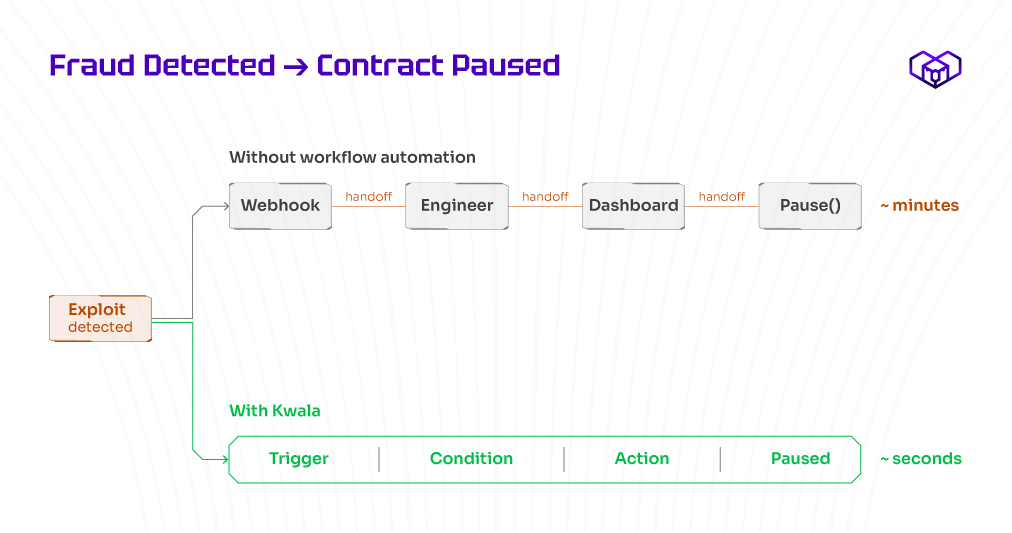
Watching for transaction patterns that look suspicious — sudden spikes in volume, interactions with known exploit addresses, contract calls outside normal parameters. This is where the workflow-action chain gets most valuable: a fraud-pattern alert that also pauses the affected contract is operationally different from one that just notifies an on-call engineer who then must scramble to pause the contract themselves. By the time the human responds, the funds are gone.
For more depth on AI-powered fraud detection patterns and the alert configurations that catch real exploits, see blockchain fraud detection with AI-powered on-chain alerts in real time.
Beyond Alerts: Connecting Notifications to Automated Workflows
This is where Kwala diverges from the rest of the alerts category, and it’s worth spending time here because it’s the entire reason to use a workflow platform instead of a webhook tool.
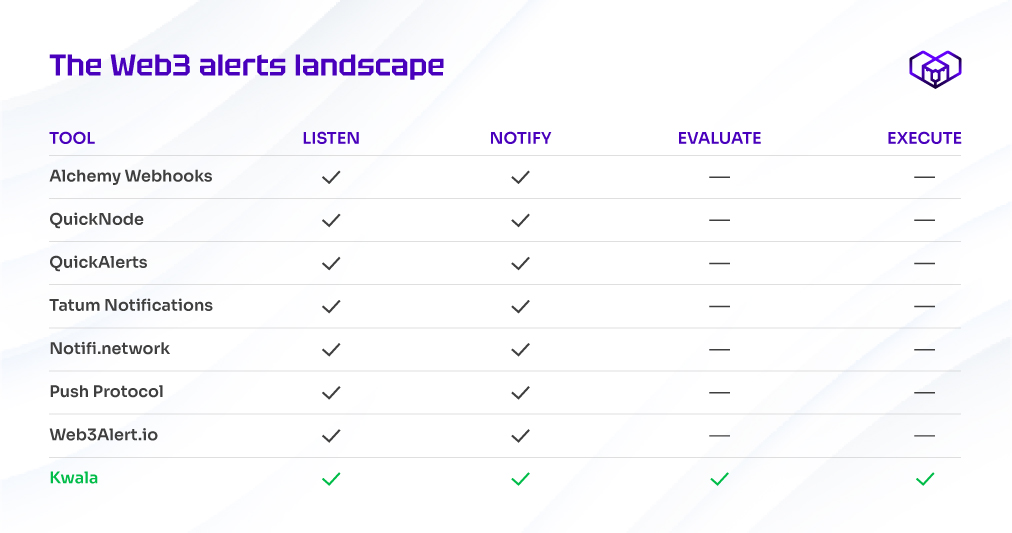
Most Web3 alert tools — Alchemy Webhooks, QuickNode QuickAlerts, Tatum Notifications, Notifi.network, Web3Alert.io, Push Protocol — are notification systems. They watch the chain, detect events, and push messages to a configured endpoint. What happens next is the customer’s responsibility. The customer typically builds a backend service to receive the webhook, parse the event, decide what to do, retry failures, and execute any on-chain actions. That’s weeks of engineering work for what is, structurally, the same shape every time.
Workflow-based alerting collapses all of that into the alert definition itself. Instead of “alert me when X happens,” the configuration is “when X happens, do Y, then Z, then notify me if anything failed.” The alert is just the trigger; the workflow is the response.
A few canonical alert→action chains:
Price drop → auto-rebalance.
A token in a portfolio drops 5% relative to the basket. Alert fires. Workflow checks current allocation, calculates rebalancing trades, executes the swaps via DEX, and verifies the new allocation matches the target. The user finds out the rebalance happened, not that they need to log in and rebalance manually.
Low balance → auto-top-up.
A relayer wallet drops below the funding floor. Alert fires. Workflow pulls funds from the treasury, sends them to the relayer, and confirms the transaction. The relayer never runs dry; the on-call engineer never gets paged.
Fraud detected → auto-pause contract.
A pattern matching a known exploit signature appears in transactions targeting a vault. Alert fires. Workflow calls the vault’s pause function, freezing further interactions while the team investigates. The window between detection and protection collapses from minutes to seconds.
Governance proposal passes → auto-execute.
A DAO vote crosses the quorum and approval threshold. Alert fires. Workflow waits for the timelock to expire, then executes the on-chain action the proposal authorized. No human in the loop for the operational step.
Whale movement → auto-hedge.
A tracked whale wallet sends a large amount of a token to an exchange — a common pre-dump signal. Alert fires. Workflow opens a hedge position via a perpetuals protocol. Whether the hedge is the right call is a strategy question; whether it executes in time is a workflow question.
The pattern in all of these: the human reads the post-action summary, not the pre-action alert. That’s the structural change.
The architecture is straightforward. A Kwala workflow has three parts — a trigger, conditions, and actions — and any of those can compose. A trigger can be an on-chain event, a price feed crossing a threshold, a wallet balance change, or a Web2 webhook. Conditions can chain (price drops and volume spikes and time-of-day matches). Actions can run sequentially or in parallel, on-chain or off-chain, on the same chain or on a different chain. The full configuration surface is documented in the workflow builder docs.
The honest framing: not every alert needs an automated action. Some alerts genuinely just need to notify a human, and that’s fine. But most alerts in production environments have a follow-up action that’s mechanical — rebalance, refund, pause, swap — and automating those follow-ups removes a meaningful operational burden. The workflow-based alert is for the cases where the response is structured enough to encode but important enough that you can’t afford to forget it.
Kwala vs Other Web3 Alert Tools (Alchemy, QuickNode, Notifi)
A short comparison table. The fuller treatment of where Kwala sits relative to the broader Web3 stack lives in the comparison pillar, but for the specific question of alerts:
| Tool | Primary job | Notification | Action execution | Best for |
| Kwala | Workflow automation | Yes | Native (built-in workflow engine) | Alert→action chains, automated responses |
| Alchemy Webhooks | Webhook notifications | Yes | No (you build the action) | High-volume webhook delivery for custom backends |
| QuickNode QuickAlerts | Webhook notifications | Yes | No | RPC-integrated alert delivery |
| Tatum Notifications | Multi-chain webhooks | Yes | No | Multi-chain alert coverage including non-EVM |
| Notifi.network | User-facing notifications | Yes | No | Cross-channel messaging (email, SMS, push) for end users |
| Push Protocol | Decentralized messaging | Yes | No | Wallet-to-wallet notifications, decentralized notification layer |
| Web3Alert.io | Curated alert feeds | Yes | No | Pre-built alert templates for common patterns |
The pattern is consistent: every other tool in this list does notification. Kwala is the one with workflow execution built in. That’s not a feature comparison — it’s a category difference. If your need is “deliver a webhook to my backend,” any of the tools above will work and several will be better than Kwala at the specific job of high-volume webhook delivery. If your need is “do something automated when an event fires, without operating a backend,” that’s the Kwala category.
For a deeper look at how Kwala compares to the broader Web3 infrastructure landscape — including Moralis, Thirdweb, and Tatum — see the full comparison guide.
FAQs:
What is the best tool for Web3 alerts?
Depends on what comes after the alert. For high-volume webhook delivery to a backend you already operate, Alchemy Webhooks and QuickNode QuickAlerts are mature, fast, and reliable. For multi-chain alert coverage including non-EVM chains, Tatum Notifications is the broadest. For end-user-facing notifications across email, SMS, and push, Notifi is purpose-built. For alerts that should trigger automated workflows — auto-rebalance, auto-pause, auto-top-up — Kwala is the option that has the workflow engine built in. The honest answer to “what’s the best alerts tool” is: figure out what should happen after the alert, then pick the tool that handles that step natively.
How do I set up real-time blockchain notifications?
The basic shape is: define what you want to watch (an address, a contract, a price feed, a balance), define the condition that should trigger the alert (a threshold, a specific event, a pattern), and define where the notification should go (a webhook, a channel, an on-chain action). With a webhook-only tool, that’s the end of the configuration; with a workflow tool like Kwala, you can extend the configuration to include the response action — what should happen automatically once the alert fires. For a step-by-step setup using Kwala specifically, the event listener documentation covers the full configuration surface.
Can I automate actions based on blockchain alerts?
Yes, with the right tool. Webhook-only platforms (Alchemy, QuickNode, Tatum, Notifi, Push Protocol) deliver the alert; you must build the action separately, which usually means a backend service that receives the webhook and executes the response. Workflow-based platforms like Kwala let you define the action as part of the alert configuration — when the alert fires, the platform executes the response directly, including on-chain transactions, cross-chain calls, and Web2 API integrations. The architectural difference is whether the response logic lives in your backend or in the alert definition itself.
What types of on-chain events can trigger alerts?
Five common categories cover most use cases: token price changes (via on-chain oracles or off-chain price feeds), wallet balance changes (native asset or ERC-20), smart contract events (any logged event from any contract you have the ABI for), transaction patterns (size thresholds, address-to-address flows, function calls matching specific signatures), and governance events (proposal creation, vote casting, quorum reached, timelock expiration). Beyond these, custom triggers can be defined for almost any on-chain condition that can be expressed as a check against block-level state. The limiting factor is usually not what can trigger an alert but what should — alert fatigue is a real operational risk.