

Workflow components
Every workflow consists of several components that define its behavior and execution:- Triggers: A trigger defines when and how workflows are activated. Triggers listen to specific events, conditions, or time intervals to initiate workflow execution. Learn more about workflow triggers.
- Condition: Determines whether the workflow should proceed based on specific criteria. Conditions evaluate trigger data and decide if actions should execute. For example, only proceeding if a transaction amount exceeds a threshold or a specific wallet address is involved.
- Action: Defines what happens when the trigger fires and conditions are met. Actions can include calling smart contracts on any supported chain, sending webhooks to external APIs, transferring tokens between addresses, or coordinating multiple operations across different networks. Learn more about workflow actions.
- Execution policy: Specifies how the workflow runs, including execution mode, retry logic, and priority settings. This determines whether actions run sequentially or in parallel, and how the system handles failures.
- Expiry/TTL: Ensures workflows don’t execute indefinitely or after they’re no longer relevant. You can set time-to-live parameters that automatically deactivate workflows after a specified period.
- Cross-chain dependencies: Allows workflows to coordinate actions across multiple blockchain networks. Kwala handles complex multi-chain orchestration such that you can define cross-chain logic in a single workflow definition.
Execution modes
Kwala supports two execution modes that determine how your workflow actions are processed:Sequential
Actions execute one after another in order
Parallel
All actions execute simultaneously
Sequential execution
In sequential mode, actions execute one after another in the order they’re defined. Each action waits for the previous action to complete before starting. This mode is useful when:- Later actions depend on the results of earlier actions
- You need to maintain a specific order of operations
- Actions must complete in a deterministic sequence
Parallel execution
In parallel mode, all actions execute simultaneously. This mode is useful when:- Actions are independent of each other
- You want to maximize execution speed
- Multiple operations can happen at the same time
Triggering and testing API workflows
Workflows with an API trigger are started by an HTTP request. Kwala generates ready-to-use cURL commands for both the one-time and recurring flows, each with a Test and a Live variant, so you can trigger without writing any client code.- Test cURL — a dry-run against your deployed workflow. It validates the request and returns the response schema but does not execute the workflow’s actions. Use it to confirm the endpoint, authentication, and schema.
- Live cURL — actually triggers the workflow and executes its actions on-chain.
cURL testing only works after the workflow is deployed — the commands are generated against the deployed endpoint, so triggering fails on an undeployed workflow.
production=false(Test / dry-run) vsproduction=true(Live)recurring=false(one-time flow) vsrecurring=true(recurring flow)
<name>_<wallet>) is your workflow name joined to your wallet address. It is generated at deploy — copy it from the panel, do not construct it by hand.
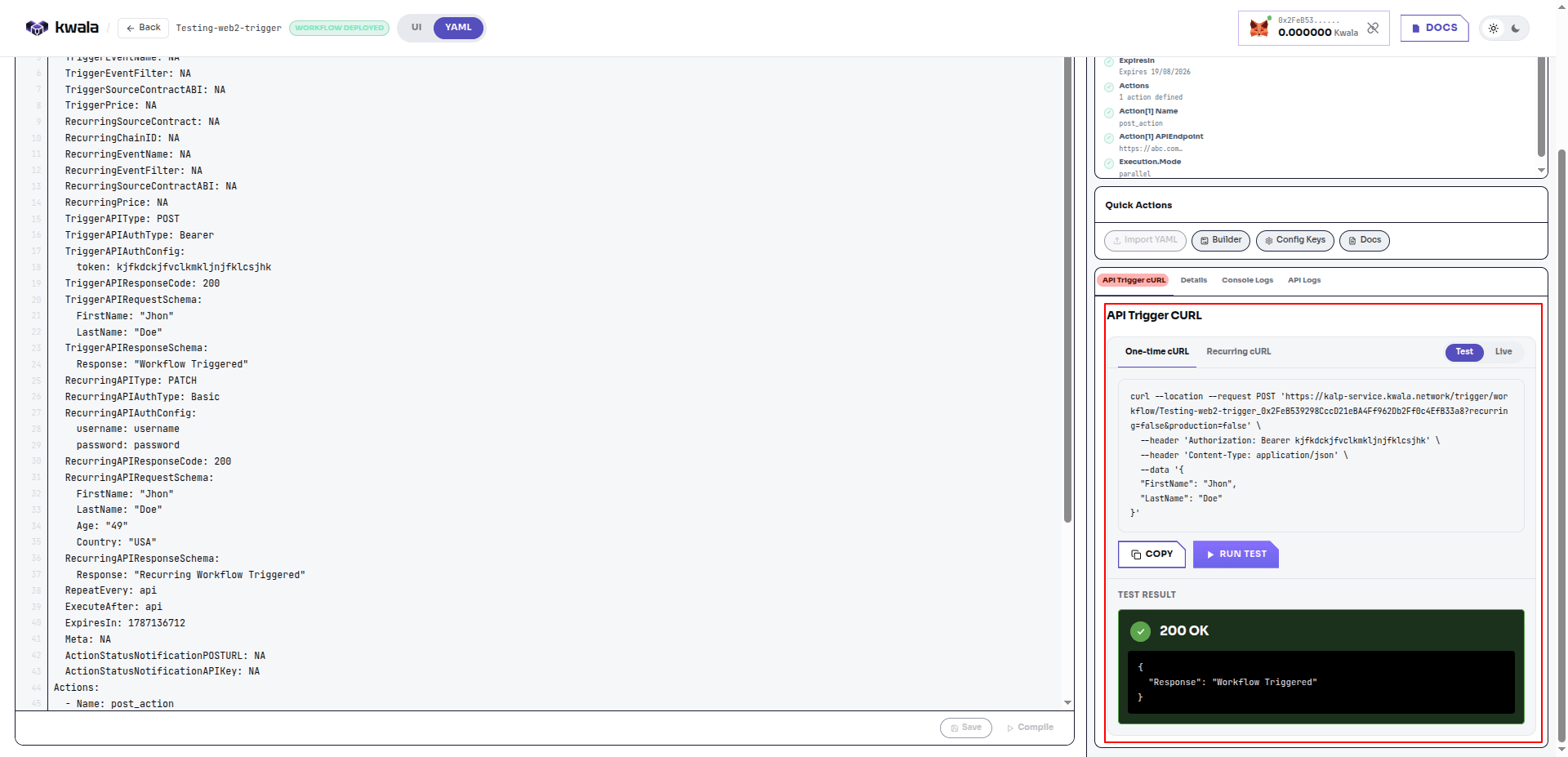
Test the one-time flow
The following example runs the one-time flow as a dry-run. A successful test returns the configured response schema and a200 OK.
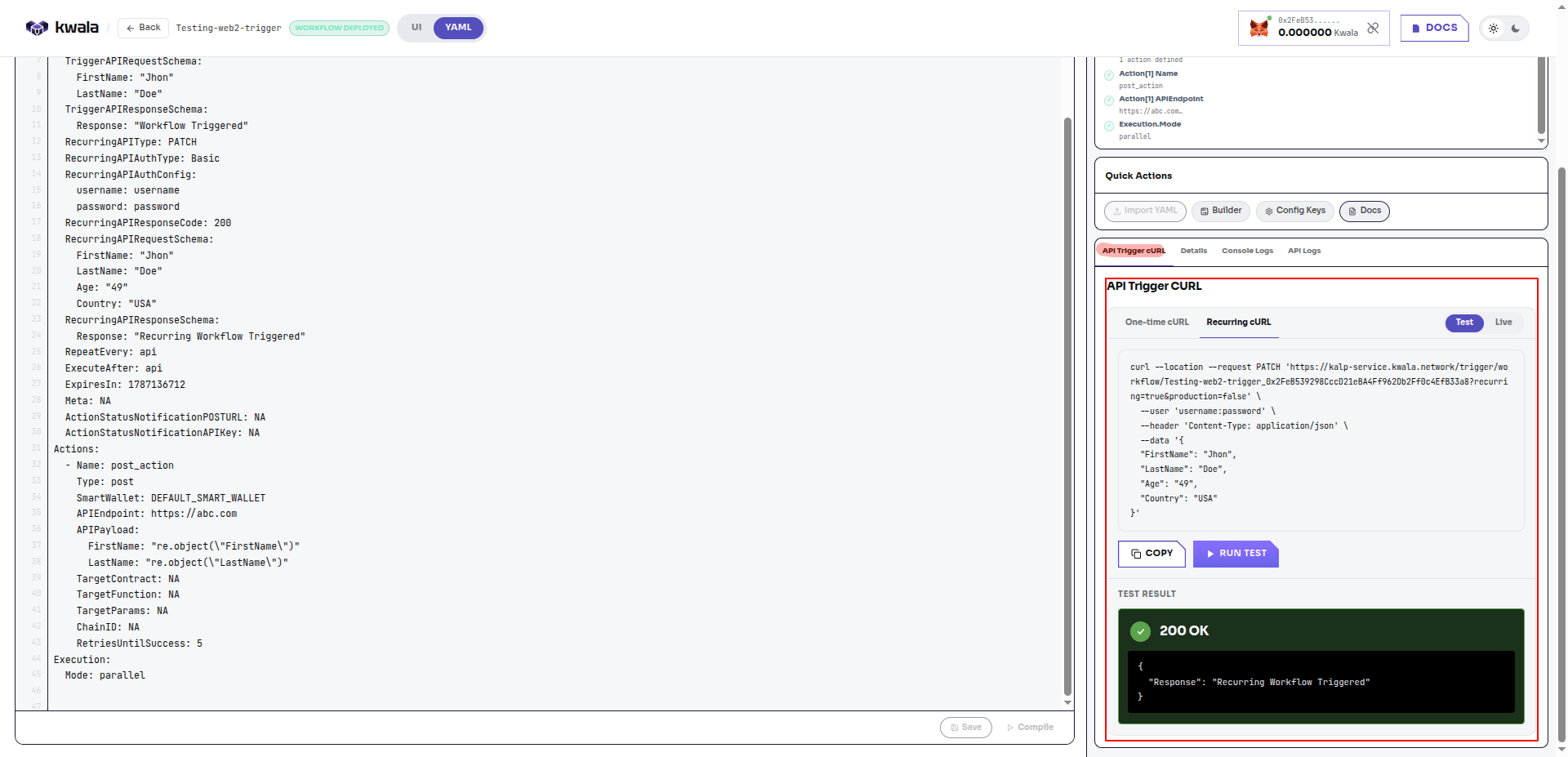
Test the recurring flow
The recurring flow is tested from the Recurring cURL tab. Note therecurring=true parameter and the Basic-auth --user flag matching the recurring authentication.
Trigger the live workflow
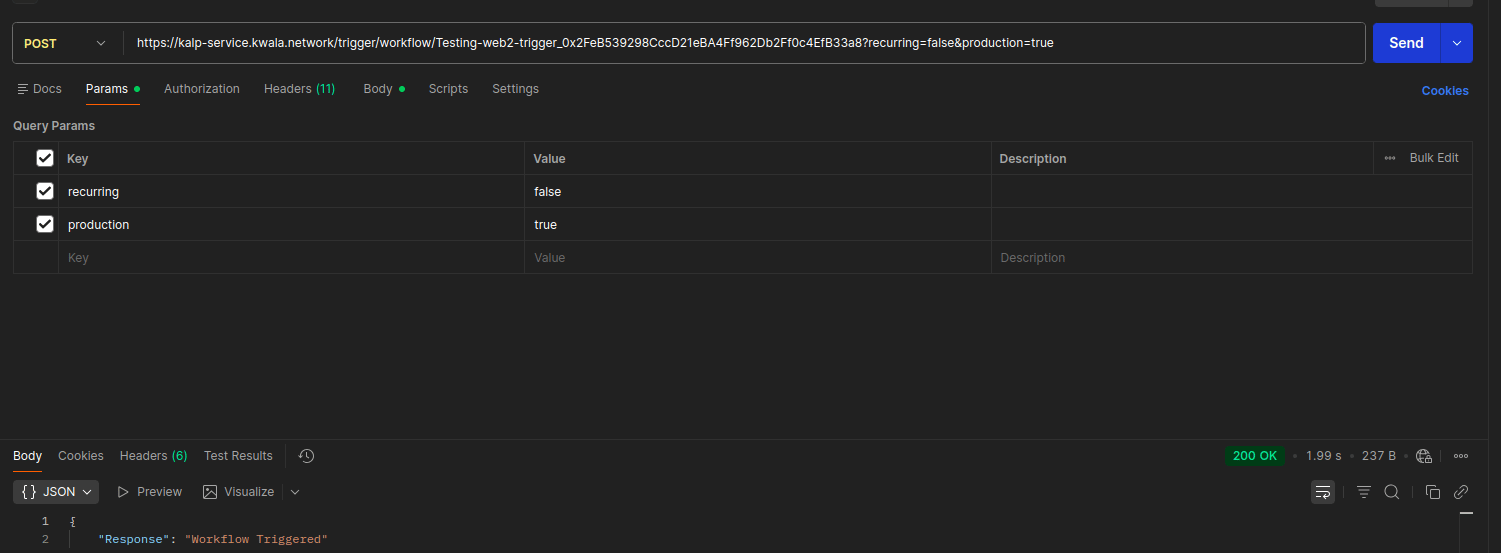
The Live cURL cannot be triggered from the Kwala UI, because a live call executes real on-chain actions. Copy the Live command and run it from your own environment — a terminal, Postman, a backend service, a webhook, or any system that can send an HTTP request. The only difference from the Test command isproduction=true.
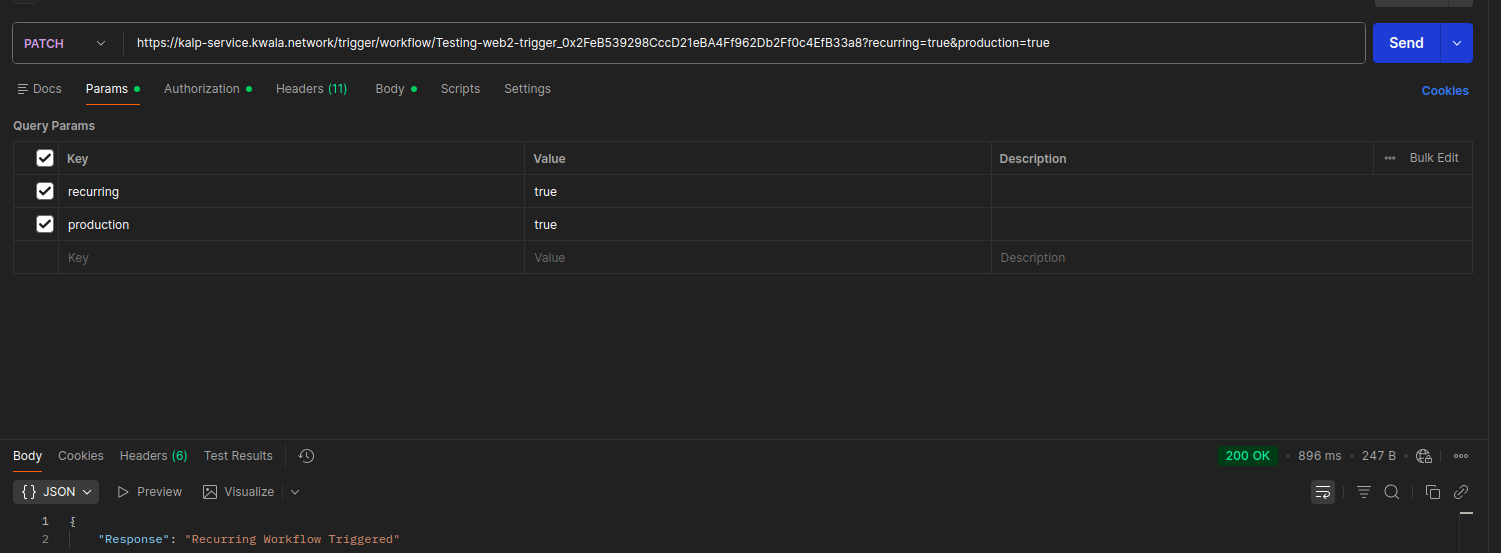
The following example is the one-time Live command sent from Postman. Because the workflow’s action is an HTTP POST action, running this live command executes that action.
recurring=true&production=true.
API logs
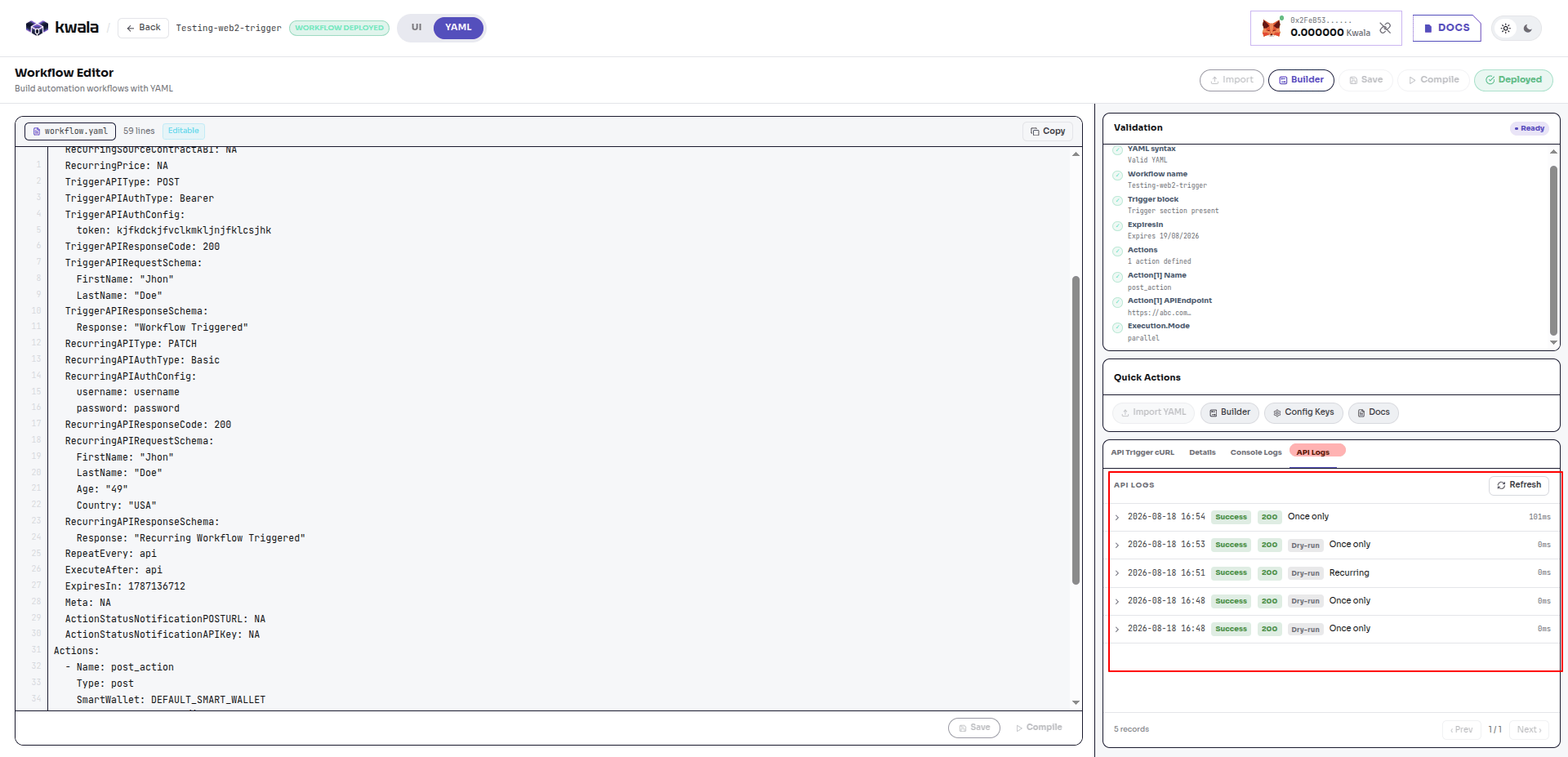
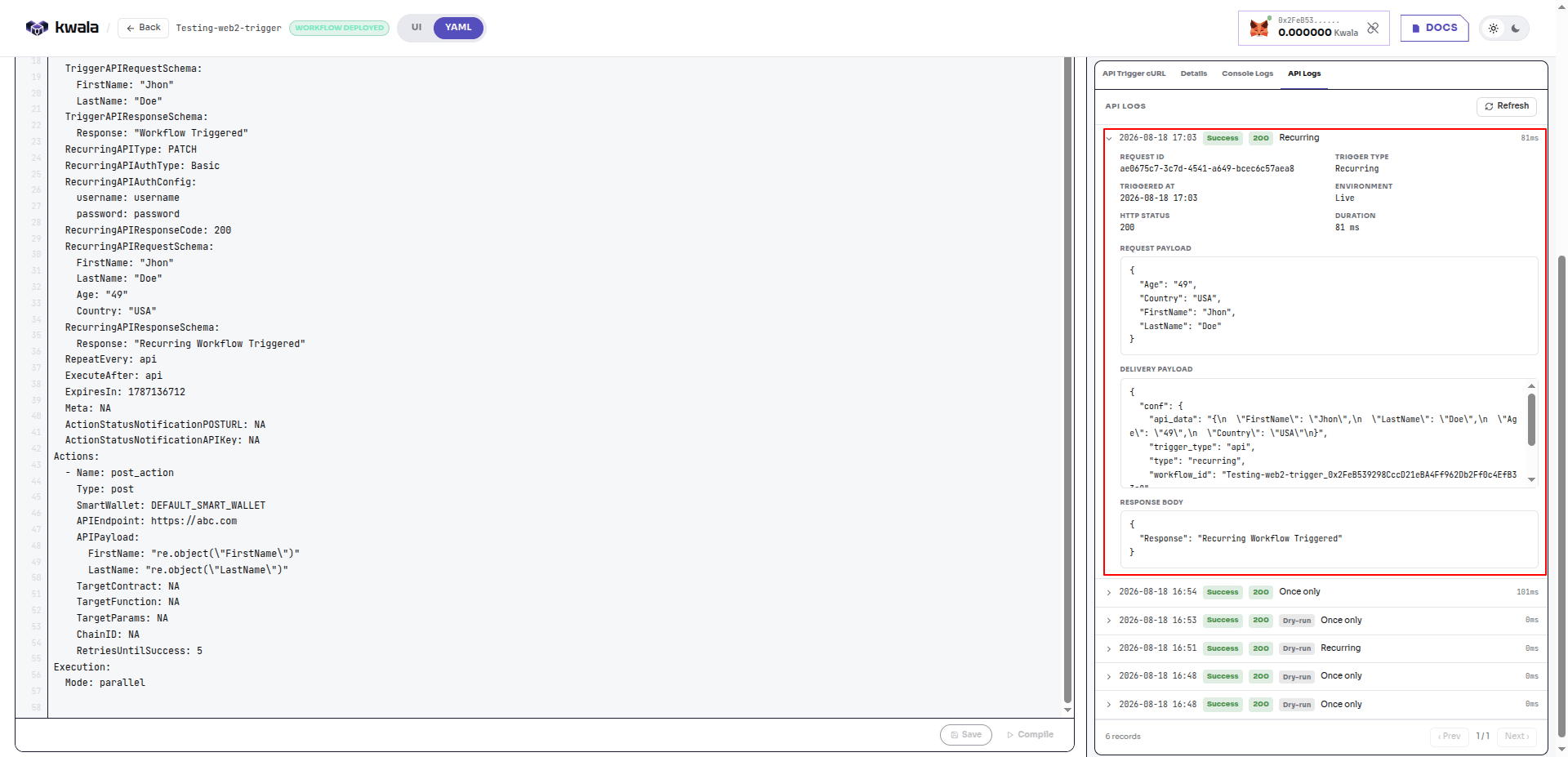
For transparency, every trigger — Test and Live, one-time and recurring — is recorded in the API Logs tab. Each record shows the timestamp, status, HTTP code, trigger type, and duration. Dry-run (Test) calls are labeled so you can distinguish them from live executions. Expand any record to inspect the full details of that call: request ID, trigger type, environment (Live or dry-run), HTTP status, duration, request payload, delivery payload, and response body.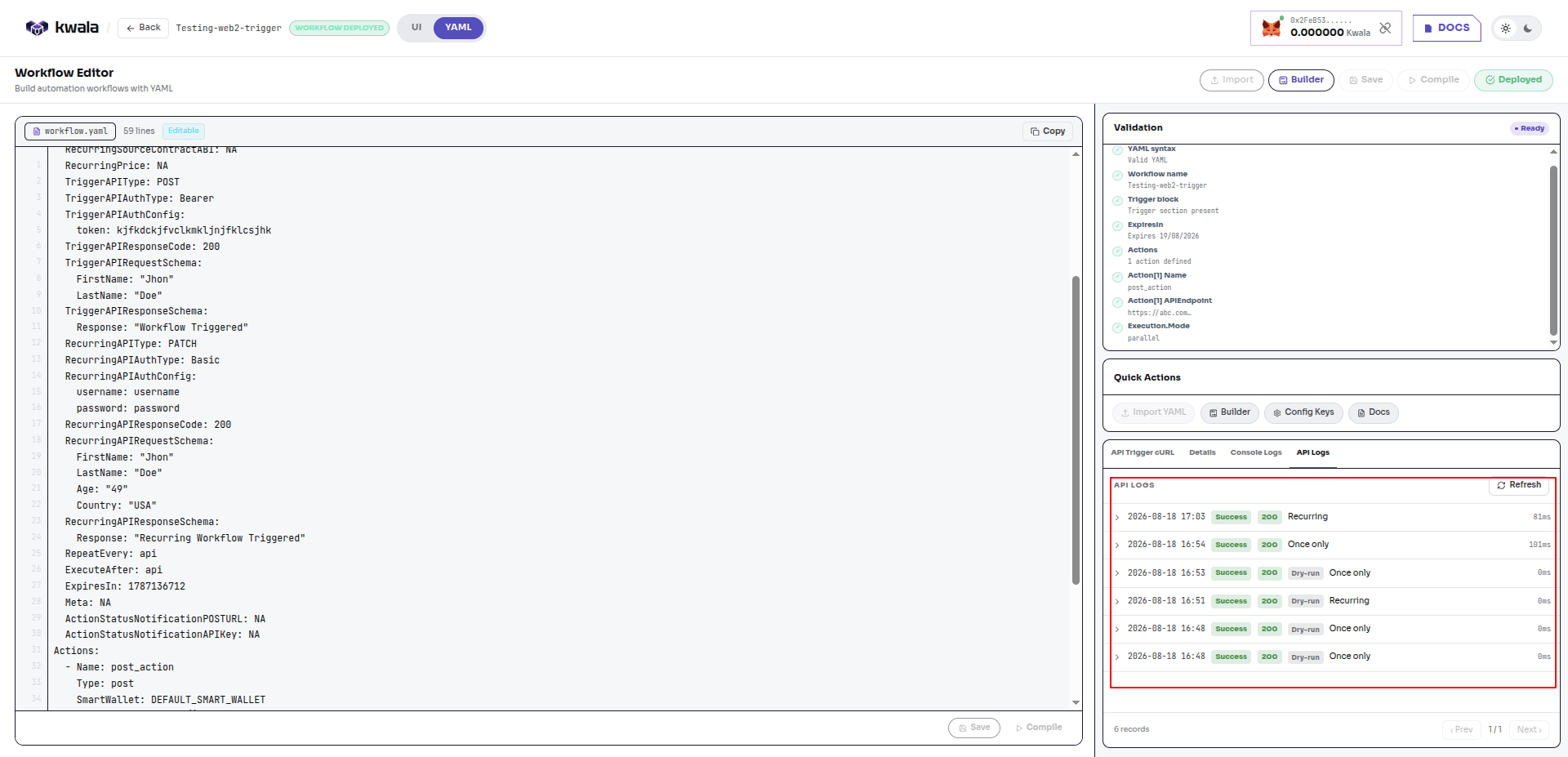
Deploy before you trigger
An API trigger workflow must be deployed before its endpoint accepts calls. Deploy follows the enforced order: Save stores the definition, Compile validates it as a dry run (nothing goes on-chain, and any edit resets the compile), and Deploy goes live and costs0.001 KWALA. API trigger workflows are set to expire 1 day after deployment — redeploy to keep a long-running endpoint active.
Workflow execution lifecycle
Understanding the workflow lifecycle helps you monitor and debug executions. Every Kwala workflow follows a four-step execution process:1
User-signed intent
The user defines a workflow in YAML and signs it using their self-custody wallet. This signature creates a cryptographic commitment that the user cannot later deny (non-repudiation). The signed workflow is submitted to the Kwala network and stored on-chain as an immutable record of the user’s intent.
2
Trigger detection
Kwala nodes continuously monitor on-chain events, price feeds, and time intervals to detect when workflow triggers activate. When a trigger condition is met, eligible nodes compete to claim the right to execute the workflow. The first node to successfully claim the workflow begins the execution process.
3
Execution and proof generation
The executing node validates the signed intent against the on-chain record to ensure the workflow has not been tampered with. The node then processes the workflow logic, executes all defined actions, and generates a cryptographic proof of execution. This proof is stored on Kwala’s decentralized ledger and includes all inputs, outputs, and state transitions that occurred during execution.
4
Verifier node audit
Independent verifier nodes re-compute the workflow logic and compare their results against the execution proof submitted by the executing node. If a node deviates from intent, it is slashed or blacklisted via on-chain governance.
Next steps
Working with Actions
Learn about action types and parameters
Working with Triggers
Master workflow trigger configuration
Best Practices
Follow production workflow guidelines
Kwala Explorer
Monitor your workflow executions